Getting started
Three screens, and none of them asks for a key
First launch looks at your machine and tells you what it found — claude, opencode, ollama, with versions. It runs them as subprocesses, so whichever account you're already signed into is the one it uses. There is no key field anywhere, because there's nowhere for a key to go.
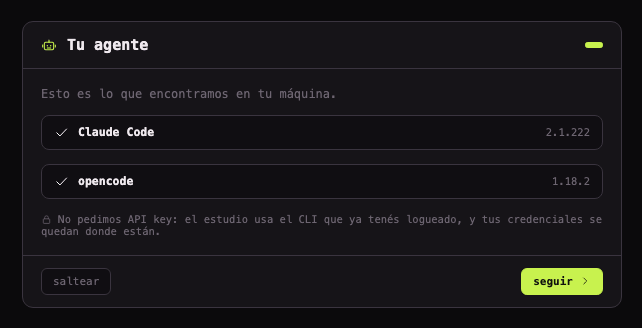
- Your agent. It lists what it found. If nothing is installed you can skip and set it later — the studio still works, you just can't hand anything off yet.
- Your first project. Point it at a folder. The backend scans it and works out which projects live inside and what they're built with. You don't declare a stack.
- Ready. A summary of what it picked. All of it is changeable later from Settings — nothing here is a commitment.
Working alone? A build with BEESPACE_LOCAL=1 drops the team hub and person-to-person chat entirely. It isn't a lesser version — it's the half we're most confident in.
Mapping your system
Three operations, three prices, and you choose
Open Architecture before anything else has happened and you get your code's modules — one node per top-level folder, its purpose lifted from the README or the header comment, arrows for the imports between them. Useful, but it's not an architecture yet. Turning it into one is a separate, deliberate step, because half the answer is something no parser can know.
Opens the map you already have. Reads never extract, so returning is instant — and the date of the last scan is on screen, because a cached map is an old map.
Runs the extractors over the repo and deduces what it can from your manifests. Costs patience and no tokens.
Asks a model for the part a parser can't reach. One call — and you read the exact prompt first.
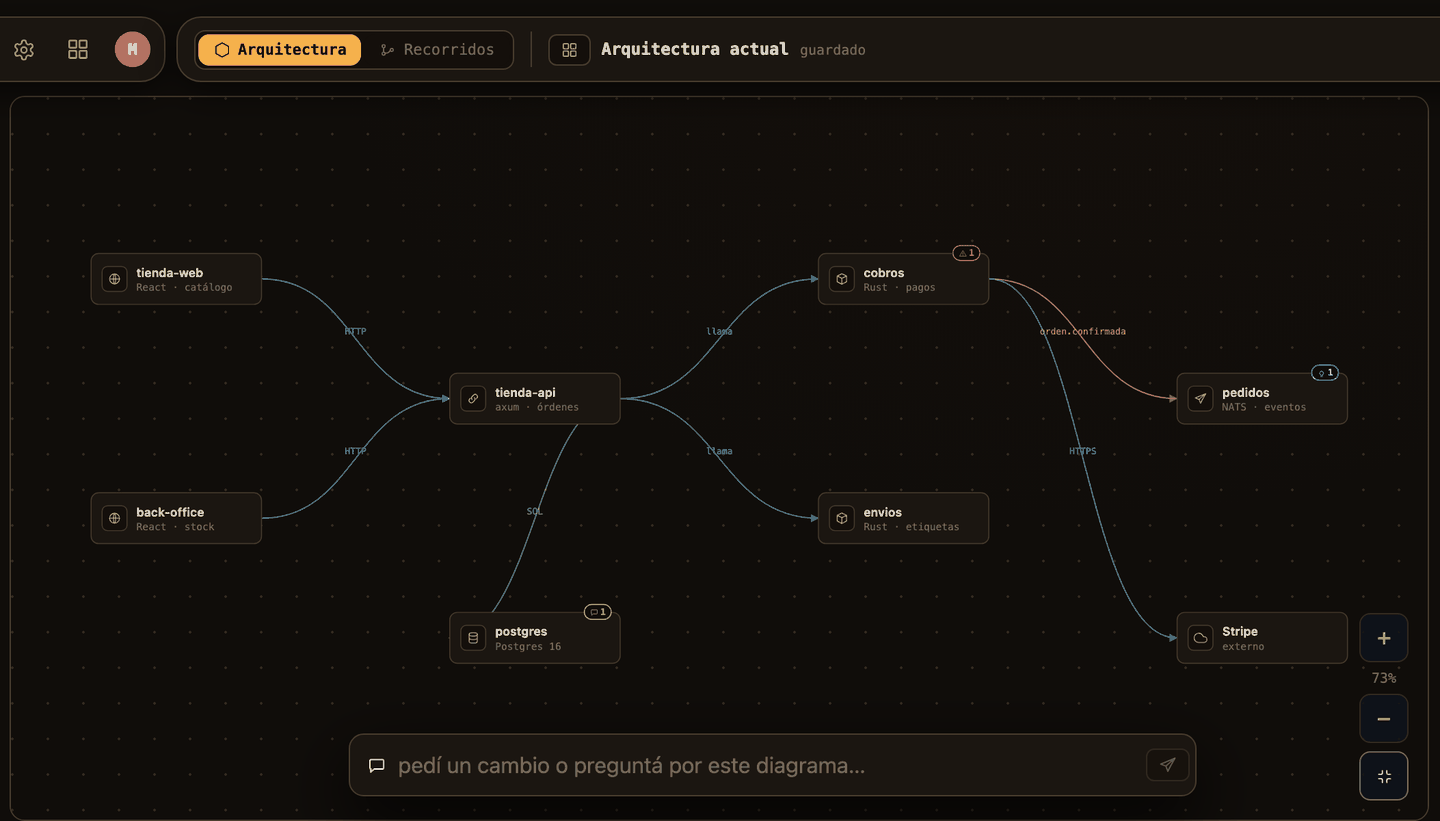
You can edit the map by hand, and editing costs nothing. That matters more than it sounds: a model that guessed wrong is cheap to correct and expensive to re-run, so correcting is the default path, not re-analysing.
Tracing what actually happens
The layer that answers a question a diagram can't
A map tells you what exists and how it connects. It doesn't tell you what happens when someone creates a user: the client hits the backend, the backend queries the database, and there it forks — if the email already exists it ends in a 409; if not, it saves and ends in a 201. That's a flow, and it's drawn in lanes: the row says who acts, the column says when.
Finding them and drawing them are two separate calls, on purpose. Discovering proposes the list of journeys your system has, without their steps. Tracing draws one in detail. Asking a model for eight detailed flows at once comes back truncated, and one bad step in the seventh would make you pay for all eight again. So a flow that's been discovered but not traced isn't an error or a half-finished trace — it's a second call you haven't asked for. And if you already know which one matters, type its name and skip discovery altogether.
Your corrections outlive the model. Fix a step by hand and the fix survives the next trace; delete one and it stays deleted instead of being re-proposed every run. What the model wanted to add back is stated — «N corrections kept», «N steps you deleted were proposed again» — because dropping things silently would hide what it believes, and not dropping them would ignore what you decided.
The by-product is the part people don't expect. Every fork in a flow is a business rule wearing a question mark: «does this email already exist?» is really «a user's email is unique». Those get published to the knowledge base as one article each — so tracing a screen quietly writes down the rules behind it, and those outlive the diagram.
Working a feature
A room, not a ticket
A feature is a conversation with a backlog attached. Your people are in it, and so are expert agents — a reviewer, an architect, a designer — each with their own tools and their own limits. You can pull a specialist in with @ even when they aren't part of the group.
You don't have to start by discussing. When you create one you choose how it begins: talk it through first (the usual), send it straight to a flow, or hand it straight to an agent. Refinement produces subtasks. Some stay with a person; the ones that are clear enough get handed to an agent, and that's where the next section starts.
Boards are per team and you can have several, each with its own columns. A feature closes itself when its subtasks are done — there's no archiving step to remember.
Handing work to an agent
Five steps, and you're the brake on step three
The thing worth knowing before anything else: an agent doesn't write in your repo. Every job opens its own git worktree, works there, and what it did reaches your branch only if you merge it.
- It asks first. Not a chat — a form with concrete options («SQLite or Postgres?»). This is where cheap misunderstandings get corrected, before they cost half an hour of work done wrong.
- It proposes a plan. A task list, and not a single file touched yet. This is where you see whether it understood: if the plan looks wrong you close and rephrase, instead of reviewing a rotten diff.
- You approve. Nothing runs until you press it. If it needs a tool it wasn't pre-authorised for, it stops and asks — allow, deny, or always allow — without losing its place.
- It works, and you watch. Tasks get crossed off live, with its reasoning, the diff per task, and the log if something failed. You can comment on one task without stopping the rest.
- You merge or throw it away. Merge brings the work to your base branch; on a conflict it aborts and touches nothing. Discard deletes the whole worktree and your repo looks like none of it happened. There's no weird in-between state.
Retrying doesn't start over — it picks the conversation back up, so «that's wrong, do it again but with X» works and it remembers the context. If a job hangs, after sixty seconds the interface marks it as stuck rather than leaving you watching a spinner.
One checkbox skips all of this. «Apply directly to the main repo» lets the agent write over your files with no merge to review. Handy for touch-ups, risky for anything else — and it's off unless you turn it on.
The knowledge base
Four ways in, and one of them is automatic
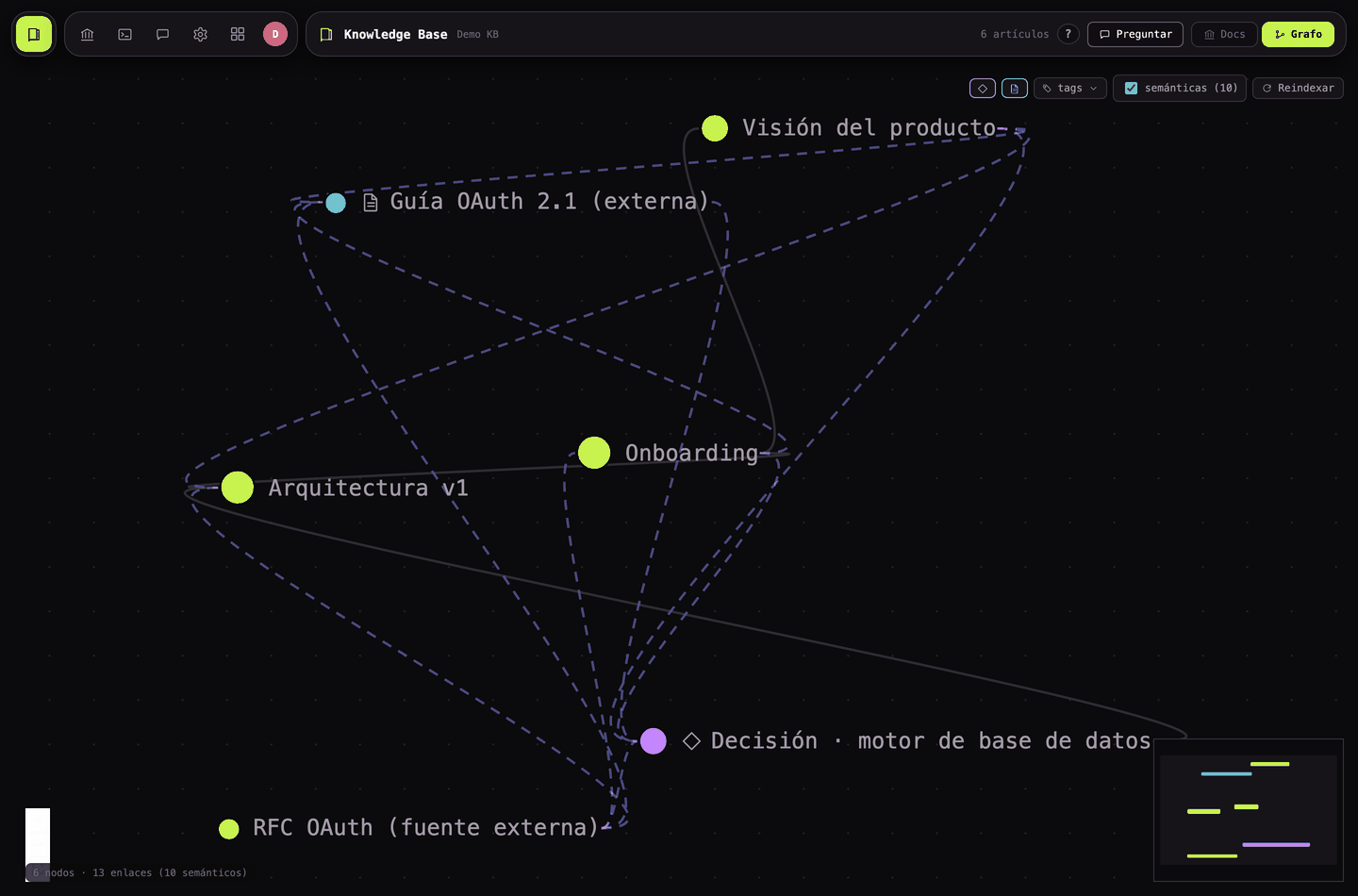
It's the project's memory, and it's what the agent reads for context. Search runs on a local model — it downloads once on first use and after that indexing and querying never touch the network.
- Files from the repo, linked. Pick any markdown, image or text file and its content is copied and kept tied to the original. Edit the file and the article is marked stale — it's telling you there's a newer version unpublished. Delete the file and the content survives, but there's nothing left to update from.
- Articles you write. Native to the base, tied to no file, so they never go stale. This is the natural home for what doesn't live in code — decisions, business context, glossaries.
- Sources from outside. Paste a URL and it downloads it and strips the HTML clutter, or paste text directly. An RFC or a third-party doc ends up inside the same brain as everything else.
- Rules from a flow. The one you don't do by hand — tracing a journey publishes the business rules it uncovered, one article each.
Team and permissions
Nothing is allowed unless it's granted
There's no permissive default to discover the hard way: an action nobody granted is denied, full stop. Permissions are named actions — 71 of them — and you hand them out by role or to one person, whichever suits. A deny beats everything, so revoking is always the safe move.
Sections follow from this rather than being configured separately: a part of the app appears when you hold at least one action inside it. Which also means hiding isn't protecting — a section you can't see is a section whose actions you don't hold, and the check happens on the server either way.
If you're running it alone, none of this is in your way — and the BEESPACE_LOCAL=1 build doesn't ship the team side at all.
What this guide doesn't cover
It's a public beta and the honest list is kept in one place rather than sprinkled around. Person-to-person chat has known bugs — the general thread is shared and misattributes the author — which is one reason the solo build exists. Database migrations aren't versioned yet, so treat the SQLite file as disposable. And the full breakdown of what's built, what's half-built and what isn't started lives on the overview.